> ## Documentation Index
> Fetch the complete documentation index at: https://rajanand.org/llms.txt
> Use this file to discover all available pages before exploring further.
# How to enable SQL Server database for publication
### Problem:
I have configured the distributor and then trying to create a publication on the publication server using `sp_addpublication` stored procedures with respective parameters. I have got the below error message.
### Error message:
> Msg 14013, Level 16, State 1, Procedure sp\_MSrepl\_addpublication, Line 178 \[Batch Start Line 3]
> This database is not enabled for publication.

### Solution:
#### Using SSMS:
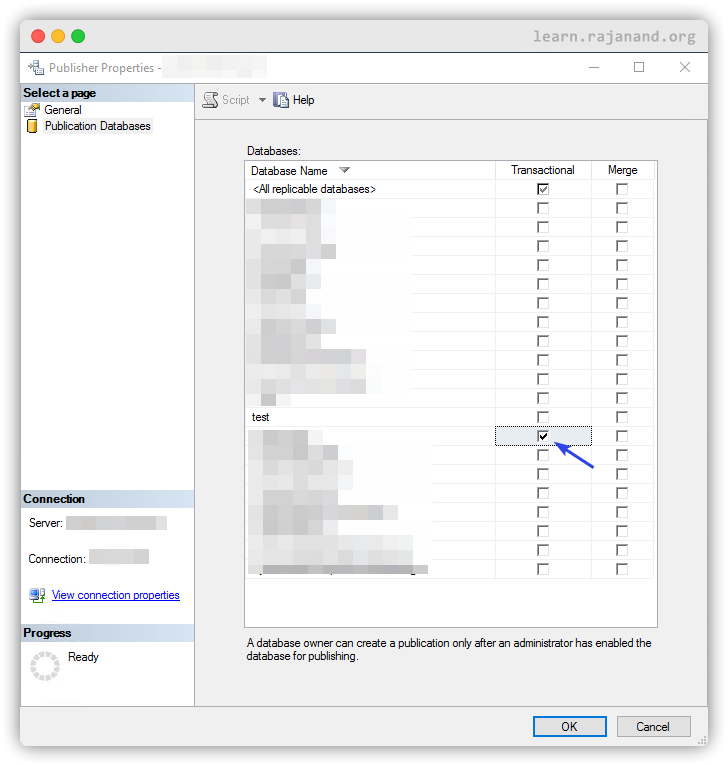
1. Right click on the replication folder in object explorer and open publisher properties.
2. Select "Publication Databases" and then enable transactional or/and merge replication according to your requirement. Then click OK.
#### Using T-SQL:
```sql theme={"system"}
use your_publication_db_name;
exec sp_replicationdboption @dbname = 'your_publication_db_name',
@optname = 'publish',
@value = 'true'
go
```
Related post:
1. [How to fix "This database is not enabled for publication" issue when the replication option is already enabled in SQL Server?](https://blog.rajanand.org/how-to-fix-this-database-is-not-enabled-for-publication-issue-when-the-replication-option-is-already-enabled-in-sql-server)