> ## Documentation Index
> Fetch the complete documentation index at: https://rajanand.org/llms.txt
> Use this file to discover all available pages before exploring further.
# Software as a Service
SaaS is a cloud computing model that delivers software applications over the internet on a subscription basis. Users can access these applications via a web browser without needing to install or maintain any software locally. SaaS eliminates the need for hardware provisioning, software installation, and ongoing maintenance, making it a popular choice for businesses and individuals alike.
## 1. **What is SaaS?**
SaaS (Software as a Service) is a cloud-based software delivery model where applications are hosted by a service provider and made available to customers over the internet. Users typically access the software through a web browser or a thin client, paying a subscription fee for usage. Examples include email services, customer relationship management (CRM) tools, and productivity suites.
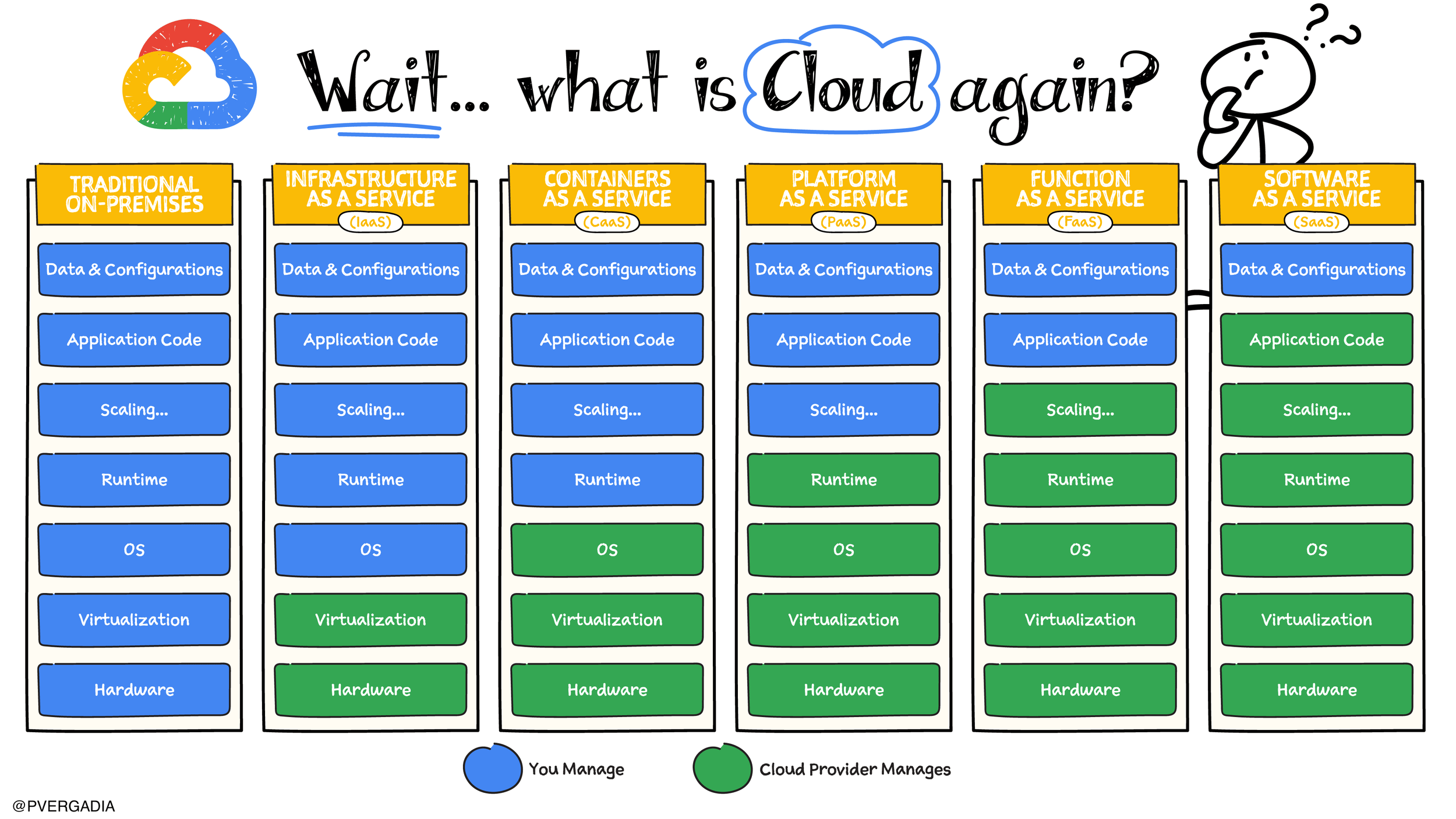 [source: thecloudgirl.dev](https://www.thecloudgirl.dev/compute/what-is-cloud)
## 2. **Key Features of SaaS**
* **Accessibility**: Applications are accessible from any device with an internet connection.
* **Subscription-Based Pricing**: Users pay a recurring fee (monthly or annually) rather than purchasing software outright.
* **Automatic Updates**: The provider handles software updates and maintenance.
* **Multi-Tenancy**: A single instance of the software serves multiple customers (tenants), with data separation ensured.
* **[Scalability](/glossary/scalability)**: Users can easily scale up or down based on their needs.
* **Integration**: SaaS applications often integrate with other tools and services via APIs.
## 3. **How SaaS Works**
1. **Hosting**: The SaaS provider hosts the application and its data on their servers.
2. **Access**: Users access the application via a web browser or app.
3. **Subscription**: Users subscribe to the service, often with tiered pricing based on features or usage.
4. **Usage**: Users interact with the software, with all data stored in the cloud.
5. **Maintenance**: The provider handles updates, security patches, and infrastructure management.
## 4. **Benefits of SaaS**
* **Cost-Effective**: No upfront hardware or software costs; pay only for what you use.
* **Ease of Use**: No installation or maintenance required; accessible from anywhere.
* **Automatic Updates**: Users always have access to the latest features and security patches.
* **Scalability**: Easily adjust the number of users or features as your needs change.
* **Collaboration**: Enables real-time collaboration among users.
* **Disaster Recovery**: Data is stored in the cloud, reducing the risk of data loss.
## 5. **Challenges of SaaS**
* **Internet Dependency**: Requires a reliable internet connection for access.
* **Data Security**: Concerns about storing sensitive data on third-party servers.
* **Limited Customization**: SaaS applications may not offer the same level of customization as on-premises software.
* **Vendor Lock-In**: Migrating data and processes to another provider can be difficult.
* **Performance Issues**: Shared resources may lead to slower performance during peak times.
## 6. **Use Cases of SaaS**
* **Productivity Tools**: Applications like Google Workspace and Microsoft 365.
* **Customer Relationship Management (CRM)**: Tools like Salesforce and HubSpot.
* **Enterprise Resource Planning (ERP)**: Systems like SAP Business ByDesign and Oracle NetSuite.
* **Collaboration Tools**: Platforms like Teams, Slack and Zoom.
* **Human Resources Management**: Software like Workday and BambooHR.
## 7. **Popular SaaS Providers**
* **Google Workspace**: Offers productivity tools like Gmail, Docs, and Drive.
* **Microsoft 365**: Includes Office applications like Word, Excel, and Teams.
* **Salesforce**: A leading CRM platform for sales, service, and marketing.
* **Zoom**: A video conferencing and communication platform.
* **Dropbox**: A cloud storage and file-sharing service.
## 8. **Best Practices for Using SaaS**
* **Evaluate Providers**: Choose a reputable provider with strong security and compliance measures.
* **Understand Pricing**: Be clear on subscription costs, including any potential hidden fees.
* **Data Security**: Ensure the provider offers robust security features like encryption and access controls.
* **Integration**: Check for compatibility with existing tools and systems.
* **User Training**: Provide adequate training to ensure users can effectively utilize the software.
* **Monitor Usage**: Regularly review usage and costs to optimize your subscription.
## 9. **Key Takeaways**
* **SaaS**: A cloud-based software delivery model where applications are accessed over the internet on a subscription basis.
* **Key Features**: Accessibility, subscription-based pricing, automatic updates, multi-tenancy, scalability, integration.
* **How It Works**: Hosting, access, subscription, usage, maintenance.
* **Benefits**: Cost-effective, ease of use, automatic updates, scalability, collaboration, disaster recovery.
* **Challenges**: Internet dependency, data security, limited customization, vendor lock-in, performance issues.
* **Use Cases**: Productivity tools, CRM, ERP, collaboration tools, HR management.
* **Providers**: Google Workspace, Microsoft 365, Salesforce, Zoom, Dropbox.
* **Best Practices**: Evaluate providers, understand pricing, ensure data security, check integration, provide user training, monitor usage.
[source: thecloudgirl.dev](https://www.thecloudgirl.dev/compute/what-is-cloud)
## 2. **Key Features of SaaS**
* **Accessibility**: Applications are accessible from any device with an internet connection.
* **Subscription-Based Pricing**: Users pay a recurring fee (monthly or annually) rather than purchasing software outright.
* **Automatic Updates**: The provider handles software updates and maintenance.
* **Multi-Tenancy**: A single instance of the software serves multiple customers (tenants), with data separation ensured.
* **[Scalability](/glossary/scalability)**: Users can easily scale up or down based on their needs.
* **Integration**: SaaS applications often integrate with other tools and services via APIs.
## 3. **How SaaS Works**
1. **Hosting**: The SaaS provider hosts the application and its data on their servers.
2. **Access**: Users access the application via a web browser or app.
3. **Subscription**: Users subscribe to the service, often with tiered pricing based on features or usage.
4. **Usage**: Users interact with the software, with all data stored in the cloud.
5. **Maintenance**: The provider handles updates, security patches, and infrastructure management.
## 4. **Benefits of SaaS**
* **Cost-Effective**: No upfront hardware or software costs; pay only for what you use.
* **Ease of Use**: No installation or maintenance required; accessible from anywhere.
* **Automatic Updates**: Users always have access to the latest features and security patches.
* **Scalability**: Easily adjust the number of users or features as your needs change.
* **Collaboration**: Enables real-time collaboration among users.
* **Disaster Recovery**: Data is stored in the cloud, reducing the risk of data loss.
## 5. **Challenges of SaaS**
* **Internet Dependency**: Requires a reliable internet connection for access.
* **Data Security**: Concerns about storing sensitive data on third-party servers.
* **Limited Customization**: SaaS applications may not offer the same level of customization as on-premises software.
* **Vendor Lock-In**: Migrating data and processes to another provider can be difficult.
* **Performance Issues**: Shared resources may lead to slower performance during peak times.
## 6. **Use Cases of SaaS**
* **Productivity Tools**: Applications like Google Workspace and Microsoft 365.
* **Customer Relationship Management (CRM)**: Tools like Salesforce and HubSpot.
* **Enterprise Resource Planning (ERP)**: Systems like SAP Business ByDesign and Oracle NetSuite.
* **Collaboration Tools**: Platforms like Teams, Slack and Zoom.
* **Human Resources Management**: Software like Workday and BambooHR.
## 7. **Popular SaaS Providers**
* **Google Workspace**: Offers productivity tools like Gmail, Docs, and Drive.
* **Microsoft 365**: Includes Office applications like Word, Excel, and Teams.
* **Salesforce**: A leading CRM platform for sales, service, and marketing.
* **Zoom**: A video conferencing and communication platform.
* **Dropbox**: A cloud storage and file-sharing service.
## 8. **Best Practices for Using SaaS**
* **Evaluate Providers**: Choose a reputable provider with strong security and compliance measures.
* **Understand Pricing**: Be clear on subscription costs, including any potential hidden fees.
* **Data Security**: Ensure the provider offers robust security features like encryption and access controls.
* **Integration**: Check for compatibility with existing tools and systems.
* **User Training**: Provide adequate training to ensure users can effectively utilize the software.
* **Monitor Usage**: Regularly review usage and costs to optimize your subscription.
## 9. **Key Takeaways**
* **SaaS**: A cloud-based software delivery model where applications are accessed over the internet on a subscription basis.
* **Key Features**: Accessibility, subscription-based pricing, automatic updates, multi-tenancy, scalability, integration.
* **How It Works**: Hosting, access, subscription, usage, maintenance.
* **Benefits**: Cost-effective, ease of use, automatic updates, scalability, collaboration, disaster recovery.
* **Challenges**: Internet dependency, data security, limited customization, vendor lock-in, performance issues.
* **Use Cases**: Productivity tools, CRM, ERP, collaboration tools, HR management.
* **Providers**: Google Workspace, Microsoft 365, Salesforce, Zoom, Dropbox.
* **Best Practices**: Evaluate providers, understand pricing, ensure data security, check integration, provide user training, monitor usage.